
CAPITAL MARKETS

How To Export Contacts From Outlook To Excel

African american businessman working on a laptop.
LightBox Insights
Insights Blog & Reports
February 27, 2019 · 1 min read

Manually exporting contacts from Microsoft Outlook 2013, 2016 or Office 365 into Excel is easy. Exporting is beneficial if you need to transfer your contacts into a different application like our ClientLook® commercial real estate software, or if just want to make a backup of your data. Either way, the process is easy if you follow the simple steps outlined below.

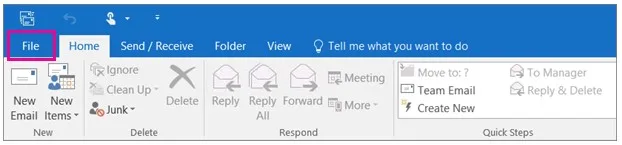
Step 1: Open Outlook and click on the File tab at the top left:
Export-Contacts-From-Outlook-To-Excel_1 (1)

Next >

Related posts

Handsome man at cafeteria, cafe working on laptop

How To Perform a Mail Merge In Word Using An Excel Spreadsheet

Share this insightLinkedInXEmail

Related Insights

Subscribe to LightBox Insights

Loading form

Faster decisions. Fewer surprises.

Clarity you can stand on. LightBox is the Decision Foundation for the Built World.